Introduction
Shopify stores generate a lot of data. Every store gets orders and customers data from Shopify, marketing data from Meta and Google Ads, website analytics from Google Analytics, events from 3rd party apps like bundlers and search widgets, events from payment providers, summaries from email marketing platforms like Klaviyo, and some operations data.
This is a lot of data, and all of it is disconnected from the rest. Most founders can’t make sense of any of this data – because data from different sources rarely matches.
That’s where GA4 shines. GA4 helps us connect most of this data into one coherent whole. It becomes the single source of truth for most of your data, and helps connect data from various sources to each other – GA4 data helps you connect marketing reports with Shopify orders, 3rd party data with website data, emailers with marketing sessions, and so forth – creating new ways of looking at your data that lead to actionable insights for stakeholders.
But this takes months of time and effort. In this series, we will get started with GA4 data and build models to get the most out of it. This is the first and biggest leap in analytics. Once you have a stable base with GA4 data, connecting other data sources becomes easier.
Note that we are not going to use the GA4 dashboards at all here. For our purposes, GA4 is simply a data collection tool and the real value is unlocked when you export this data to BigQuery, build data models and connect this data with all the other data sources you have at your disposal.
Let’s start with a very short overview of the series.
Journey from GA4 Events to Data models
In this series of blogs, we will take GA4 data for Shopify Stores and change it into something way more useful – data models.
In simple words, data models are tables made on top of raw data so we don’t have to deal with raw data all the time. I have created data models for 10s of startups and I will share the best data models for Shopify stores, alongwith the queries.
But I will also explain the basics of working with GA4 data in bigquery so you can create your own models. We will look at GA4 events export to Bigquery, event structure, type of events available by default, useful details inside the events, and how to query for these details.
Then we will build up to data models.
We will also look at how these events result in the pre-made reports on Google Analytics platform. This will enable you to use the GA4 platform with more confidence and clarity.
Table of Content
Exactly, what are GA4 Events?
Before we dive into data models, we should get familiar with the events available in GA4. For Shopify stores, GA4 collects two sets of events:
- GA4 Events- these are collected by GA4 for all websites and include page_view, user_engagement, etc.
- Store specific events – these are part of Shopify-GA4 integration and include events such as view_item, add_to_cart, purchase, etc.
GA4 Events
When you connect GA4 to a Shopify store, GA4 automatically collects some data. The image below shows the ‘Enhanced measurement’ section of GA4 Data Stream Settings (admin > data streams > selected stream > enhanced measurement settings)
Make sure all of these are ON (including Site Search if you have a search option on your store).
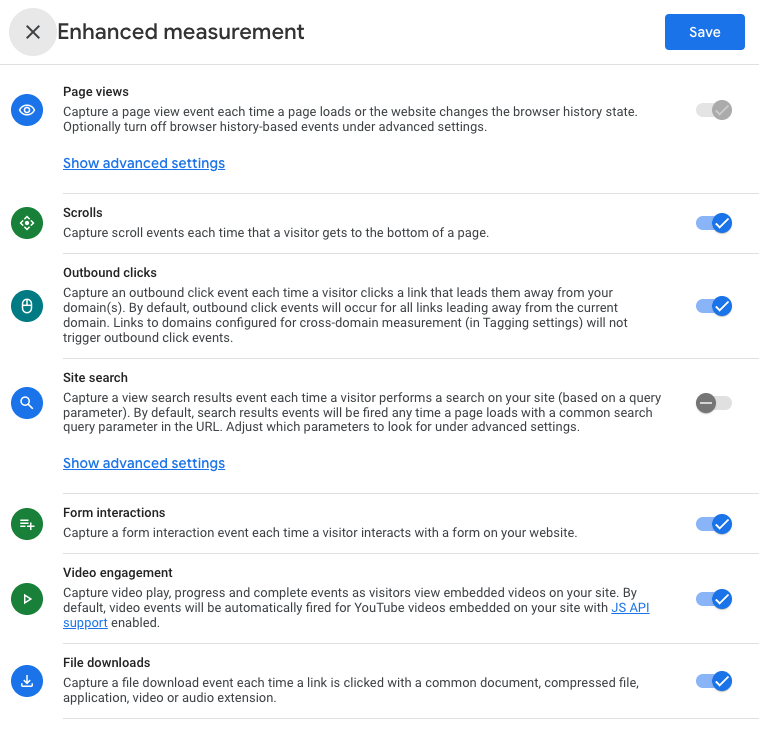
GA4 collects the above events for all websites (not just shopify store) where it’s connected. However, there’s no add to cart or purchase event in this list so it’s clearly not ready for Shopify Store yet.
Shopify-GA4 Integration
That’s where GA4-Shopify integration comes into the picture. When you connect your GA4 account to your Shopify Store through the right methods, GA4 starts collecting these events –
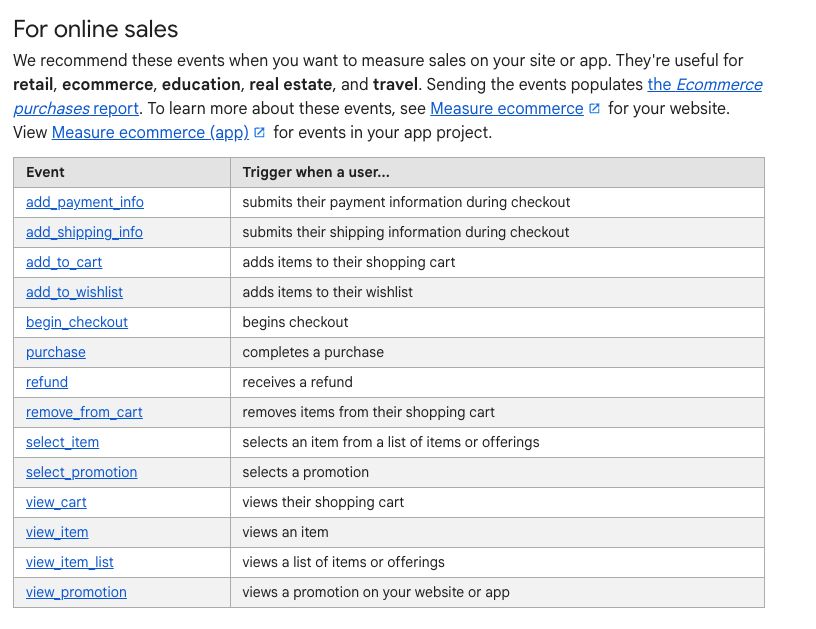
Note that you only get a subset of these events. The above list from Google is more of a recommendation than a requirement. Only the relevant events are available by default as Shopify describes in a blog here:
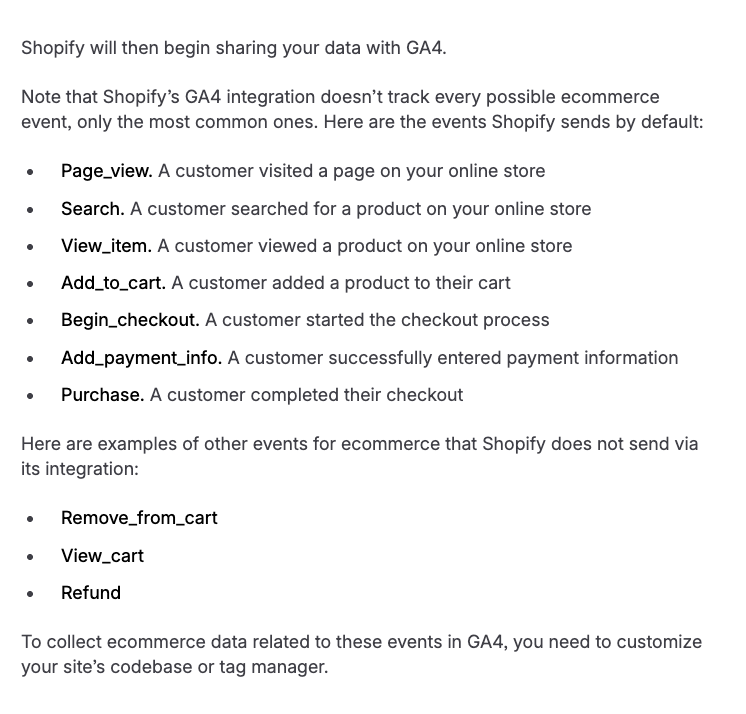
You will see many names for these events in documentation – custom, recommended, enhanced, etc. I call them ‘GA4 Events‘ for simplicity.
If you connect GA4 to your website with some competency, you should get the right set of events. If you have 3rd party payment providers (like Razorpay, Gokwik, etc.), you might need to talk to them for getting the purchase events. (more details in purchase events post)
GA4 events capture essential information like page loads, add to carts, purchase, etc. and they are sufficient to build data models for product reports, product analysis, marketing reports and more.
The reports on GA4 (landing page, acquisition, ecommerce purchases and all others) are based on the same events. These reports are often misunderstood and poorly used. In this series, we will see how these events are used to calculate the reports. This will help you get more use out the existing reports on GA4.
Once we build data models, we will verify them against the data in GA4 reports. It should match very closely – almost exactly. GA4 is the baseline.
But GA4 reports are just the starting point. Once we have verified the data, it’s time for much better use cases.
List of events with trigger
I divide the events into 3 categories –
- initiation events: These events are triggered when a user lands on the website or navigates to a different page on the website : first_visit, session_start, page_view, view_item
- Engagement events: These events are triggered on user interactions with the website: view_search_results, user_engagement, scroll, form_start, form_submit, video_start, video_progress, video_completed, file_download, add_to_cart
- Purchase Events: self explanatory: begin_checkout, add_shipping_info, add_payment_info, purchase.
| Event Name | Trigger | Caution |
|---|---|---|
| first_visit | A user lands on the store for the first time. | Because of privacy setups and blockers, GA4 often identifies returning users as new users and triggers this event. Unavoidable. |
| session_start | Triggers at the start of a session.* | Available 99% of the time. |
| page_view | Triggers when a new page loads or an existing page is refreshed | When the data of a page is reloaded – on variant selection for example – the page_view event is triggered. |
| view_item | Triggers when a Product page is loaded. Simultaneously with page_view event. | |
| user_engagement | Triggers when user has spent some time on the website (10 seconds) or clicked on an element | It is not an user action event. |
| scroll | Triggers when the user scrolls down a page. | Default value is 90%. You can set more thresholds from GTM. |
| view_search_results | Triggers when user clicks on the search button after entering a query | |
| add_to_cart | Triggers when user adds an item to cart, or increases quantity of an item. | |
| begin_checkout | Triggers when user initiates checkout | Dependent on Payment provider. May not be available if payment is not handled by Shopify. |
| add_shipping_info | Triggers when user adds address details | Very dependent on payment provider’s setup. Not reliable. |
| add_payment_info | Triggers when user initiates payment | Dependent on Payment provider. May not be available if payment is not handled by shopify. |
| purchase | Triggers when the payment is completed and user lands on Thank-you page. | Dependent on Payment provider. May not be available if payment is not handled by shopify. |
| click | Triggers when user clicks on an outbound link. | Only for outbound links. |
| form_start | Triggers when user clicks on a form input field | |
| form_submit | Triggers when user submits a form, or presses enter. | |
| video_start | Triggers when user plays an embedded video. | Can trigger on autoplay. |
| video_complete | Triggers when user watches an embedded video till the end. | |
| video_progress | Triggers multiple times during video play. | |
| file_download | Triggers when user downloads a file from the website. |
One last thing – The models provided in the next few posts are not standard / prescribed by GA4-Shopify. They are based on my experience of working with Shopify brands. As you build these 2-3 times in your career, you will identify improvements/changes that suit your work style.
Read Next
FAQs
A new session starts when user hasn’t been active on a website for 30 minutes. It also starts if user relaunches the web browser, or opens the website on another device/browser.
There’s really no way to deal with it anymore. Only websites with logins are able to get accurate information on new and returning users. Others simply have to live with the fact that most users cannot be traced across their journeys.
Since Google analytics can no longer track a user across multiple sessions as the same user, new user counts have become seriously inflated.
If you get traffic primarily through marketing, you will get better data from Ads Managers because they most of the users are logged into Instagram or Youtube on their mobile phones where they see these ads.
Click events are only triggered when user clicks on a link that leads to another domain (that is takes the user away from your website). This is mainly intended to track affiliate clicks. It doesn’t make much sense for shopify store.
To get clicks on other elements, you need to setup events via the GTM.
Resources
- List of events from Google: https://support.google.com/analytics/answer/9234069?hl=en&ref_topic=13367566&sjid=17157386179840692612-NC
- Shopify documentation: https://help.shopify.com/en/manual/reports-and-analytics/google-analytics/google-analytics-setup