Introduction
Page View event is the single most important event in website analytics. Even the ‘purchase’ event pales in comparison to page_view when it comes to use cases.
Page View is used in reports ranging from user acquisition, engagement, user journey, and checkout. In the right hands, this event is enough to build an entire analytics stack.
For example,
- You can calculate new sessions and users just from page_view event
- you can approximate bounced sessions if there is only one page_view event in a session
- you can calculate timespent on a page as time between page_views
- you can estimate checkouts from ‘checkout’ page_view and transactions from thank-you page_view
You can also run analysis on landing page, get the best performing product and collection pages, blogs and more from just this single event. At AhaInsights, we rely on page_view event to build our free analysis templates.
But most analysts use page_view event for only one purpose – counting page-views – and even that incorrectly. Let’s fix that.
Trigger
The page_view event is triggered when –
- a page loads for the first time
- a page reloads for any reason
- refresh, variant change, user returned to the tab after a gap of hours
You can get additional page_view events as well if they are configured in the GTM or datalayer. So, there are a lot of duplicate page view events. One of our major tasks at this stage of data modeling is de-duplication of page_view.
But what is page load?
When a potential customer scrolling Instagram clicks on your ad- she is directed to your website. When this happens, three things take place (actually way more than 3 things take place, but 3 for our purposes):
- Initialization: First the code for the page is loaded.
- DOM Ready: then the structure of page is created on the browser. This is when you see blocks taking shape without content.
- Window Loaded : Finally the content loads – all those images, links, scripts that run on the page. This takes the longest.
In GTM (Google Tag Manager), you can setup triggers for each of these stages.
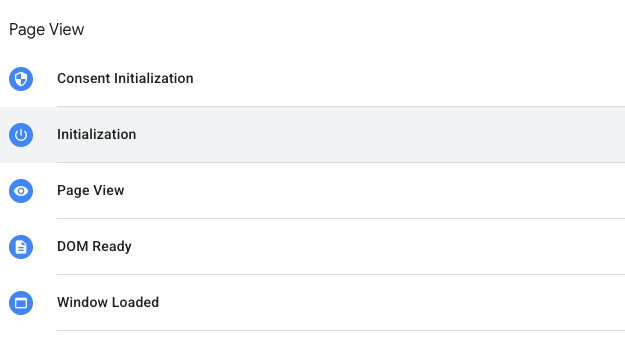
As you can see above, Page_view event is triggered immediately after initialization – way before the page has actually taken shape. Even before this happens!

Most analysts are not aware of this and treat page_view event as an actual page view from the user. But it’s not the case – specially if your users have slow internet speed, or you have a slow loading website because of high definition images, or multiple 3rd party integrations.
This is important. Most Shopify stores are not optimised for page load times. That’s partly because of the highly visual nature of e-commerce, and partly because of a lack of technical ability. If your site takes too long to load, many users will bounce before the page even loads.
Your slow loading pages will have higher bounce rates compared to faster loading pages because users don’t have a lot of patience nowadays.
User journey and page_view
Before we get into the specifics of the event, let’s understand how majority of users interact with a website. This will guide our data modeling choices.
For Shopify stores:
- majority of sessions start through Instagram and YouTube mobile apps
- sessions are short and include small number of page views
- users spend few seconds to couple of minutes on a page before moving to the next page
As majority of sessions are on mobile, users typically have only one tab open at a time. They go back and forth (For example – from collection page to product, then back to collection and then to another product, and so on).
Because of this simple linear journey – We can take the sequence of page_view events in a session as a continuous user journey on the website – because user can only be on one tab, and also because the whole thing is a few minutes long.
This means we can use page_view events to get –
- timespent on a page
- pages visited next on the website
- mode of navigating between pages.
Interpreting page_view events
In a typical user journey, page_view is triggered multiple times. Here’s what it means:
- the first instance of page_view means – a user has landed on a page on the store.
- The next instance of page_view means – the user has engaged with the store (as opposed to bouncing off).
- The sequence of page_views in a session show the user’s journey on the website – products seen, pages visited, checkouts started or not started, etc.
Event Params in page_view
I discuss event parameters in detail in the next post. For now, let’s just look at the key identifiers in page_view events:
- page title: title of the page – as shown in the browser
- page_referrer: tells you where the user has come from.
- page_location: the URL of the page
- ga_session_id
Of these, page_referrer is the least used in analytics (Even GA4 barely uses it). I have found it to the one of the most useful fields.
page_referrer parameter
Page_referrer is the URL of the page which referred the user to the current page. Mostly, it’s just the previous page in user journey. For Shopify stores in particular, page referrer helps understand how users are navigating between pages. We can find
- if users are heavily relying on back button (this means your website needs better navigation)
- if users are opening multiple tabs from collection / home page – and which ones?
- if user has opened multiple links to your store from google search results or Instagram ads in the same session
There’s one important edge case though. This happens when user clicks on the back button( or swipes back on mobile). In such cases, the page referrer still shows the original referrer of the page. For example, consider this journey:
- user lands on home page of ‘bluetees.com’ store from instagram ad (page_referrer = “instagram”)
- user clicks on a collection ‘Very Blue’ and lands on collection page (page_referrer = “bluetees.com” – the homepage URL)
- user goes back to home page with back button / swipe on mobile (page_referrer = instagram, not the collection.)
This happens because ‘Back’ button reloads the page from memory in the browser, so the data remains unchanged.
This is important if you want to control how users move about on your store. Otherwise, you don’t really need to worry about it.
Data models
While page_view is essential for analytics, we can’t use the event in it’s ‘raw’ form because the data from this event needs a lot of cleaning and prep.
There are 3 major issues with page_view events:
Messy event params
page_location and page_referrer values often contain a lot more information apart from the URL. This includes –
- section of a page (#reviews, #bundle-1, etc.)
- variant of a product (?variant_id =)
- utm details (source details)
- and more.
We use page_location for a number of analysis and models, and having all this extra information makes it difficult to group on page location. Luckily for us, the extra information is always preceded by a “?”. So we can use regex to get the part of page_location before the “?” symbol.
As a special case, we add back the variant_id. That’s because variant views are important indicators of user engagement for Shopify Stores. This is handled in the ‘all_pages’ data model below.
Duplicate events
In most data setups, you will get multiple page_view events triggering on the same page. This could be due to page reload, more than one method of GA4 integration, web pixel events, etc. Even if it’s not happening now, it will happen as your store grows and becomes more complex. so it’s must to have logic for de-duplication in the queries.
De-duplication
We can remove duplicates after cleaning up the page_location.
But what exactly is a duplicate page_view? A visitor can go the same page multiple times in a session. That’s a good thing. If a visitor is going to a PDP multiple times, it means a higher intent to buy. So we want to count it as multiple pageviews.
But what about the event getting triggered multiple times when the user is just scrolling or clicking on links within the page (like #reviews, #backtotop, etc.). In this case, we still get ‘page_view’ event but we don’t want to count this as a separate view. We remove these pageviews. They also form the majority of views in our data.
We handle this in ‘unique_pages’ data models below.
Note – GA4 does not de-duplicate data and so you often get inflated Views count in the dashboard. However, Unique Pageviews (equivalent to Sessions for a page) matches closely with the cleaned data.
Missing events
After cleaning the duplicates, it’s time to add some page_view events of our own!
On desktop, users often have multiple tabs open and they go from one tab to other and back. Users can also do this on mobile but it’s mostly a desktop behavior. The page_view event is not triggered for such page switches. But we get other events like click, scroll, user_engagement, etc..
Without that first page_view, it becomes difficult to use the engagement events. So, We add dummy events to account for these tab switches.
This is handled in the all_events data model.
Base data models
We can build three models to achieve the above:
- all_pages
- all_events
- unique_pages
As you will see in subsequent posts, these models connect the initiation models (sessions and users) with engagement models (transactions, engagement, etc.) to create a full view of user journey.
Our primary objective here is to cleanup the data for messy URLs and duplicates, and add dummy data where needed to complete the user’s journey.
Additionally, we also build the all_events model in this step to handle cases with missing page_view event.
Note – This is just one way of handling these issues. I have landed on this after several iterations and it seems to create the least number of problems.
Model : all_pages
In this model, we focus on URL cleanup. We take page information from all the events – not just page_view. This is to reduce one step the all_events model below.
Model: all_pages
Description: In the all_pages model, we extract and prepare the page_location parameter from all the events. This parameter is central to all analytics but it is not directly useful in the way it appears in GA4. So we clean up the data by removing all the extra parameters (after the ?) and flag cases which may not be reliable (3rd party data), and add a page_number counter.
| Column Name | Description |
|---|---|
| unique_key | user_id + ga_session_id + event_timestamp |
| user_id | unique identifier of the user |
| ga_session_id | unique session identifier for the user |
| page_load_timestamp | time, in micros, when the page loaded |
| page_exit_timestamp | time, in micros, when user left the page or the website. |
| page_num | page in sequence |
| event_name | Name of the event |
| event_timestamp | Timestamp, in microseconds, when the event triggered |
| event_counter | A counter to uniquely identify an event occurring more than once at the same timestamp |
| page_location_og | Page location as it is from the page_location event parameter |
| page_location | page_location_og after data cleaning. We remove everything after ‘?’ in URL except the variant id. |
| product_id | Unique identifier of the product, only available for product pages. |
| variant_id | Unique identifier of the product variant, only available for product pages. |
Model : all_events
Description: All GA4 events have page_location in the event_parameters. We want to know where a event happened which is easy to do with the page_location. Or, is it?!
Let’s consider this common use case –
- user lands on the “blue striped cotton shirt” product page through an ad
- user clicks on some buttons – product information, size options, etc.
- user clicks on ‘dark blue cotton tee’ product card and goes to another page.
- After some time, user is back on ‘black striped cotton shirt’ page and clicks on ‘add_to_cart’
Now, we know the key event of add_to_cart happened on the ‘black striped cotton shirt’ PDP page. But it happened on the second instance of the page. If we ignore this idea of instance, our calculations for ‘time between event and page load’ will be off.
We will also miss a significant part of the user journey – that the user looked at other products and pages before making this choice.
So, we want to map the event to an instance of the page load within the session, not to the first page load.
Model: all_events
Description: This model contains all the events that are in raw data with some event parameters extracted for ease of writing subsequent queries.
| Column Name | Description |
|---|---|
| unique_key | user_id + ga_session_id + event_counter |
| date_tz | Date, when event triggered, in time zone of store. |
| time_tz | Time when event triggered, in time zone of the store. |
| user_id | unique identifier of the user |
| ga_session_id | unique session identifier for the user |
| event | Name of the event |
| event_params | Event Params array from the event |
| action_event | Flag to separate user triggered event (clicks, form fills, etc.) from store events like page_view, view_cart which do not imply user action. Useful with GTM. |
| page_load_timestamp | time, in micros, when the page loaded |
| unique_page_id | unique identifier of the page. |
| event_timestamp | Timestamp, in microseconds, when the event triggered |
| event_counter | A counter to uniquely identify an event occurring more than once at the same timestamp |
| page_location | Page location, cleaned, after data cleaning. |
Model: unique_pages
The first two models – all_pages and all_events do all the heavy lifting for cleaning up the data of page_view event. unique_pages removes the duplicates, combines data together, and gives us a step-by-step picture of the user journey.
Model: unique_pages
Description: This table contains unique pageviews from all_pages_inc. It combines all instances where user has page view or dummy page view event on the same page in succession (this can happen due to variant selection, bundle selection, blog section selection, etc. ).
| Column Name | Description |
|---|---|
| unique_key | user_id + ga_session_id + event_timestamp |
| user_id | unique identifier of the user |
| ga_session_id | unique session identifier for the user |
| page_load_timestamp | time, in micros, when the page loaded |
| page_exit_timestamp | time, in micros, when user left the page or the website (in case of last page) |
| page_num | a counter for pages visited by user in a session |
| page_location_og | Page location as it is from the page_location event parameter |
| page_location | page_location_og after data cleaning. |
| page_type | Page Category |
| page_referrer | Page referrer of the page, from the first page view event. |
| product_id | for product pages only, unique id of the product. |
| variant_id | for product pages only, unique id of the product variant. |
| next_page_loc | URL of the next page visited by user on the site (null if no next page) |
| next_page_timestamp | Timestamp, in micros, of next page load (null if no next page) |
| next_page_referrer | Page Referrer value of the next page |
| timespent on page | Total timespent, in seconds, on this page |
| landing_page | flag to identify the landing page of a session |
Next Steps
Many data analysts do not build these models – taking the data from page_view as it is. This is one of the biggest reasons behind data mismatches.
These also give you great idea on how GA4 collects data – particularly for the edge cases. Handling these edge cases is essential for building trust in data team. That’s how you showcase that you really know what you are talking about.
Now we are largely done with the ‘data prep’ stage of data models. We have users, sessions, page views, and events. In the next section, we will look at Event Parameters in depth and then we will be fully equipped to build useful models.
Leave a Reply