Introduction
I will skip the part where i tell you how important this event is. You know it already. Conversion Rate, AOV, ROAS, ROI – you know these already. These are the most in-demand metrics in every store – no matter what stage it is in, no matter how different the founders are, no matter what time of day it is!
And all these metrics are based on a single event – ‘Purchase‘
While purchase is one event, the purchase journey comprises many more events. For analytics purpose, the purchase journey starts from checkout initiation and continues till an order is placed. There are many events in this flow, but only 2 that are consistently available on all stores so we will focus on them.
The first of these events is begin_checkout and the last is ‘purchase‘ itself. In between we get events like ‘add_shipping_info’, and ‘add_payment_info’ which can be useful but are not always available. More on this later.
The short journey from checkout to purchase makes up for a good fraction of all product analysis and A/B testing at Shopify Stores. That’s why I will cover these events in great detail – and in 3 separate posts. We will also use the events from previous posts and the models created on them.
In this post, the part 1 of 3 on purchase events, we will look at the purchase events and the base data models that can be built on them.
In part 2, we will use these data models to build more useful models and calculate metrics like conversion, AOV, ROAS, etc.
In part 3, we will use the Shopify Orders table in addition to GA4 data. This data is not available in GA4 but can be extracted from Shopify to Bigquery through some connectors. This will take your analytics to a while other level.
Table of Contents
Events
Event: begin_checkout
This event is triggered when user lands on the checkout page of the store.
But if your payment is happening on the Shopify payment page, the event is triggered when user lands on the checkout page. In this case the URL has a checkout-id which can be extracted using a regex statement. We can get this URL from page_location parameter of the event.
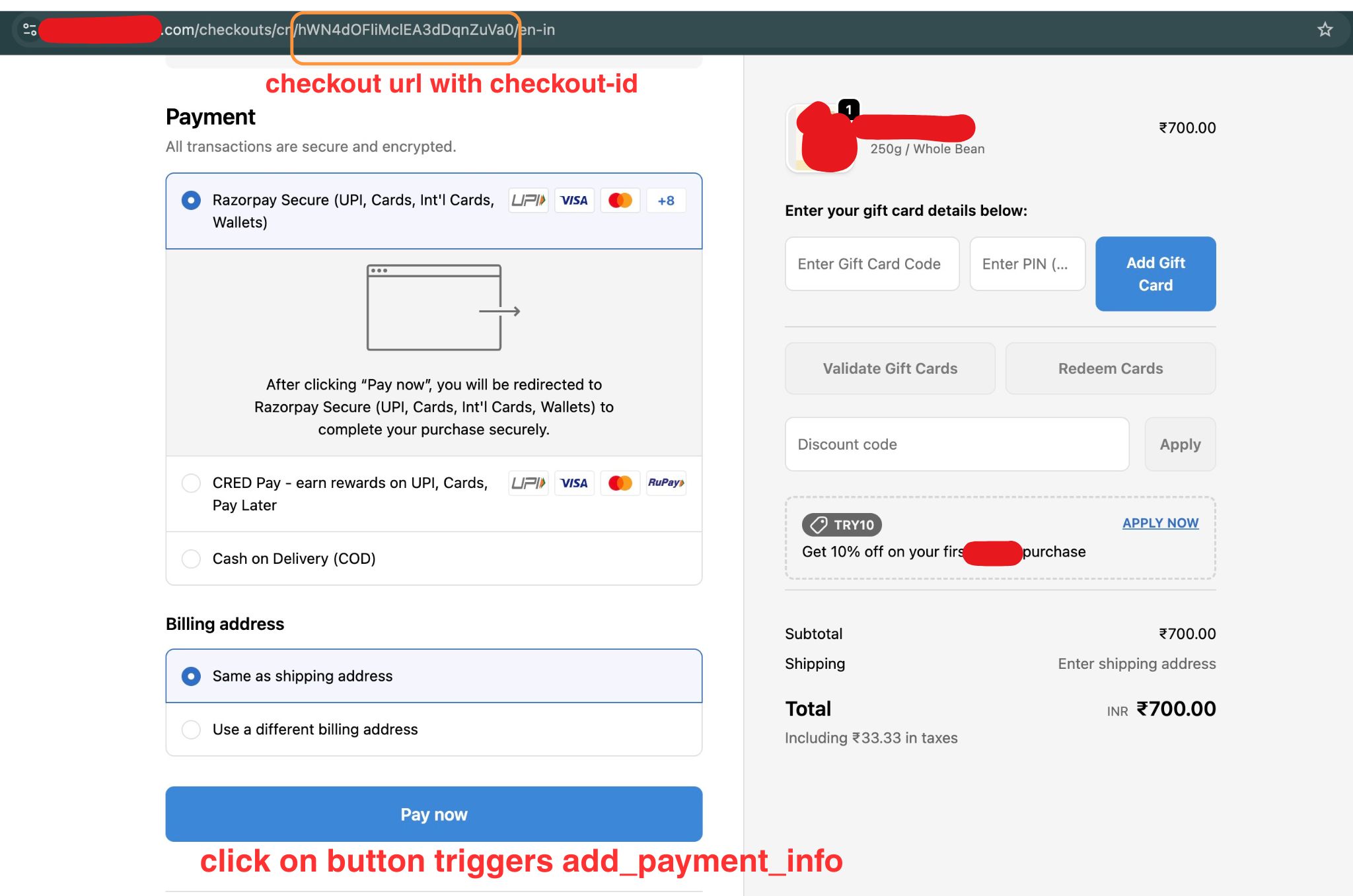
This checkout-id is useful in tracking abandoned carts. We will return to this in the next post.
If you are using a payment provider like Gokwik or Razorpay with payments happening on the overlay and not on Shopify payment page, the event will be triggered on overlay.
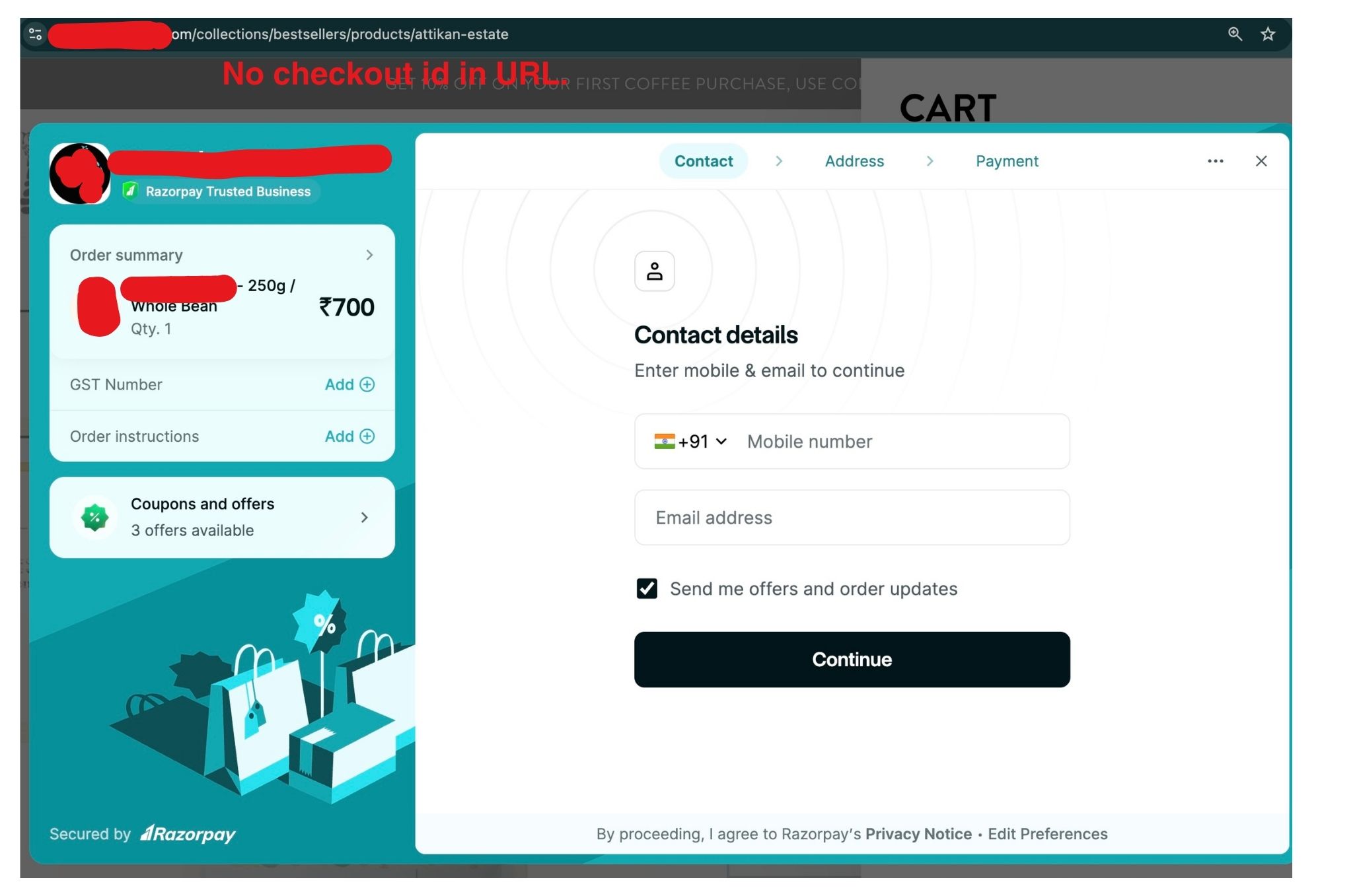
Apart from checkout-id in URL, begin_checkout also has details about the cart:
- Items array with detail of each item in the cart, it’s quantity, and price
- E-commerce details : cart items, total cart value
- Event value (as will be visible on GA4 dashboards)
- In some setups, you also get user’s contact information which can be used to tag returning purchasers.
Event: purchase
The purchase event is triggered after user has completed the purchase and landed on thank-you page.
It contains all the data you get with begin_checkout. In addition, you also get:
- transaction_id
- final amount paid including discounts and shipping and taxes
- payment method (not always available)
- coupon and discount (not always available)
- tax and shipping value
The event is triggered multiple times if the user refreshes the thank-you page or lands on the thank-you page in the next session. This can cause higher purchase counts in bigquery compared to GA4 or Shopify. However, it’s easy to remove duplicates using the transaction_id or order_id event param from the purchase event.
Event: add_payment_info
This is triggered when user clicks on the ‘Pay’ CTA on the payment page. However, if your payment is happening through ‘Shop’ app or a payment provider like ‘GoKwik’ – the event can be missing.
Before using this event, make sure that it is always available. You can verify this using GTM, or by checking that all the purchases have a ‘add_payment_info’ event as well.
This event contains the same details as begin_checkout. Additionally, you can also get the payment_method and the final payment amount including taxes, shipping and discount.
Event: add_shipping_info
This is triggered when user enters address details in the Shopify address form. It is not triggered if users address is already added. I haven’t found any good use case for this event yet.
Event: page_view
it’s time to look at page_view again. As visitors move from one stage of payment process to the next, we get page_view events in addition to the purchase events.
The URL of page_view event contains some very useful information. Here’s how the URL looks at each stage of a user’s purchase journey
- begin checkout – /store_address/checkouts/checkout-id/
- payment in progress – /store_address/checkouts/checkout-id/processing/
- payment completed – /store_address/checkouts/checkout-id/thank-you
We use the page_view event in data models to account for missing purchase events. Apart from page_view, we also get session_start, first_visit, etc. This happens when user has landed on checkout page through an abandoned cart emailer or whatsapp message. We handle these in a checkout_remarketing data model in part 2.
Purchase Events in GA4 reports.
In Google Analytics, these events are often marked as ‘key events’. This can be changed from Admin settings in GA4. These key events are used to calculate ‘key event’ and ‘value’ columns in various GA4 reports.
These events are also used for generating some important reports in the ‘Drive Sales’ section of Reports in GA4:
- Purchase journey shows user journey from session start to purchase.
- Checkout journey focuses on the journey between checkout initiation to purchase
- Ecommerce purchases is item focussed table showing views , add to carts and sales for each item
Data models
Read this first!
Purchase related data models can and do go wrong. This is because events are often coming through payment provider and the data quality is just not that great.
- If you are using a provider that processes payments outside of Shopify (like Shop, Gokwik, Razorpay, etc.) – confirm what data you are getting in GTM or bigquery, or check with the payment provider for event definition to be sure and then proceed.
- Some payment providers (like Gokwik) have their own events to capture the flow. These events are in addition to begin_checkout and purchase events.
- these extra events can be used to build a more detailed funnel
- good luck figuring out what these mean!
These events flow into almost all reports. So it’s very important to make sure you are getting correct data.
purchase_bi_events
This model is similar to events_all model. But it only contains begin_checkout and purchase event along-with items and e-commerce arrays from the two events. We make this model in addition to the events_all for two reasons:
- items array is not used for most of the data models. Thus, we reduce storage and billing by keeping it out of events base table.
- We want purchase events as they are to reduce errors. Sharing bad data on purchase is the easiest way to lose credibility as analytics.
order_details
This table contains all the purchase events alongwith parameters from items array, e-commerce, event_parameters, etc.
We also add any other detail related to the transaction based on these. Since purchase event is used in many (if not all) analysis, keeping it as a table makes sense.]
Model: order_details
Description: This model contains all the orders
| Column Name | Description |
|---|---|
| unique_key | user_id + ga_session_id + event_timestamp + event_counter |
| user_id | unique identifier of the user |
| ga_session_id | unique session identifier for the user |
| event_timestamp | Timestamp, in microseconds, when the event triggered |
| event_counter | A counter to uniquely identify an event occurring more than once at the same timestamp |
| page_location_og | Page location as it is from the page_location event parameter |
| page_location | page_location_og after data cleaning. |
order_details_itemwise
This has details of all orders placed on the site – at an item level. In other words, we generate one row of data for each item in the order. However, we don’t generate a row for each unit of an item. If there are 5 chocolate bars in an order, we will have one row with quantity = 5.
Use this table only for item level analysis. For anything else, refer to order_details table.
Model: order_details_itemwise
Description: This model has all the purchase events on store – at an item level. We extract important details from the purchase event and place it in columns for later use.
| Column Name | Description |
|---|---|
| date_ist | Date of purchase in IST |
| user_id | unique identifier of the user |
| ga_session_id | unique session identifier for the user |
| transaction_id | unique id of the transaction / purchase |
| checkout_id | checkout_id extracted from URL |
| event_timestamp | Timestamp, in microseconds, when the event triggered |
| event_counter | A counter to uniquely identify an event occurring more than once at the same timestamp |
| page_location_og | Page location as it is from the page_location event parameter |
| page_location | page_location_og after data cleaning. |
| quantity | Number of units of the item purchased. |
| item_variant_id | unique identifier of the item variant |
| item_name | name of the item, with variant. |
| item_price | Price per unit of the item. |
| item_id | unique identifier of the item |
| total_price | Total price of the item in this order. |
checkout_details_itemwise
List of all checkouts started on the website, at an item level.
Important: The count here is higher than ‘begin_checkout’ event. This is to account for cases where we have a purchase event, but no begin_checkout. How can this be?! This can happen sometime in remarketing flows when user clicks on a payment link and lands directly on the payment processing part of the checkout.
Model: checkout_details_itemwise
Description: This model has data on all the checkout initiated on the store. Here checkout initiation refers to ‘begin_checkout’ event. The checkout data is available at an item variant level for easy querying. For this reason, This contains duplicate entries for each checkout.
| Column Name | Description |
|---|---|
| date_ist | Date of purchase in IST |
| user_id | unique identifier of the user |
| ga_session_id | unique session identifier for the user |
| checkout_id | checkout_id extracted from URL |
| total_value | Total value of the items in the cart. Do not add this across rows. |
| remarkting_flag | Flag to identify is user had landed directly on checkout page. |
| event_timestamp | Timestamp, in microseconds, when the event triggered |
| event_counter | A counter to uniquely identify an event occurring more than once at the same timestamp |
| page_location_og | Page location as it is from the page_location event parameter |
| page_location | page_location_og after data cleaning. |
| quantity | Number of units of the item checked out. |
| item_variant_id | unique identifier of the item variant |
| item_name | name of the item, with variant. |
| item_price | Price per unit of the item. |
| item_id | unique identifier of the item |
| total_price | Total price of the item in this order. |
ga_purchase_line_items
This table summarizes the itemwise tables and combines them into one.
As such, it is a single summary of all items checked out and purchased on a day – by session_type and variant_id.
Model: itemwise_purchase_summary
Description: This model summaries checkouts and purchases for each item in a single table. This is to simplify queries. Note that one user initiates multiple checkouts.
| Column Name | Description |
|---|---|
| date_ist | Date of purchase in IST |
| item_variant_id | unique identifier of the item variant |
| item_name | name of the item, with variant. |
| item_price | Price per unit of the item. |
| item_id | unique identifier of the item |
| event | purchase / checkout |
| session_type | paid or organic or abandoned cart message |
| sessions | number of sessions |
| users | Number of users |
| total_quantity | Total units of the item_variant purchased. For checkout – this is taken as maximum units checked out by a user on the day. |
| total_revenue | Total value of the items purchased. For checkout – this is taken as value of maximum units checked out by a user in an instance. |
Leave a Reply