Introduction
GA4 events are powerful because each event contains a wealth of information in the form of event parameters, item details, device, geo and source details, and more! Working with these parameters makes queries shorter, more robust and more detailed.
When you first begin to work with this data in bigquery – it can be overwhelming and very confusing at first.
- The definitions are not always clear,
- edge cases keep showing up,
- and documentation is poor.
But understanding them is worth the pain because they provide so much detail about the event. I have learned this over multiple projects, and after making my share of mistakes. It took me a couple of years to fully appreciate just how much information is available in all the events and also to figure out what it means.
Each event has 100+ fields containing data about the user, website, device, first and current source, and what’s inside users cart. If you want to get value from these events, you have to understand the available data and how to extract it correctly. In this post, i want to cover the basics of these parameters and leave you with more appreciation and curiosity for them.
In addition to the details provided by GA4, we often 100 or more extra parameters on top through GTM and datalayer. All of this added information appears in event parameters of the additional events we trigger. I will cover this in details in another series.
Structure of event param array.
This is an array inside the event. You can think of it as a table inside another – a nested table. GA4 uses this structure to store large amount of information in each event. In the past, we had to define a separate column for each value and track the value stored in a documentation. Now it’s all available in event_params.
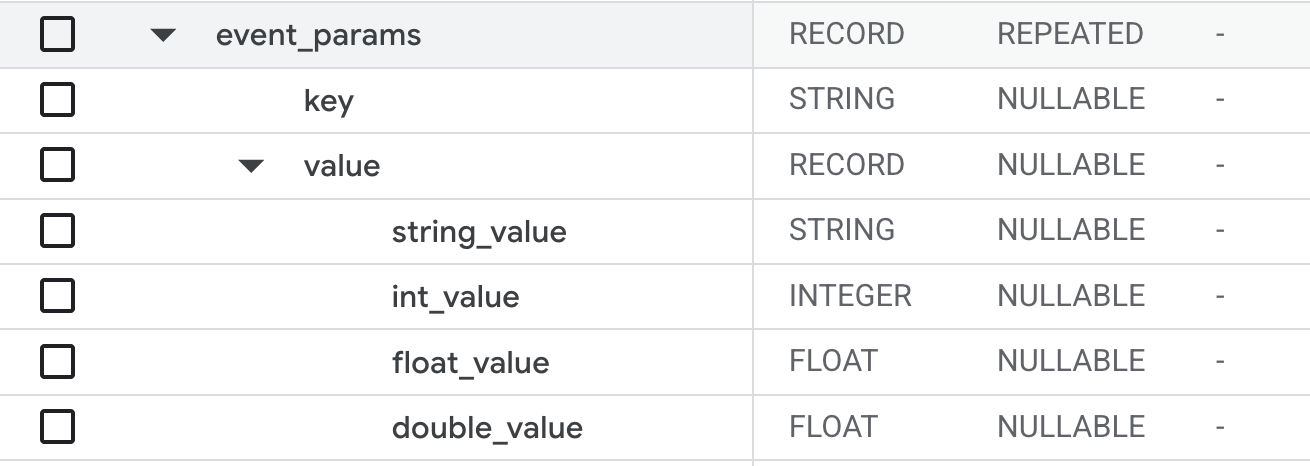
Preview of the page_view event event_params record:
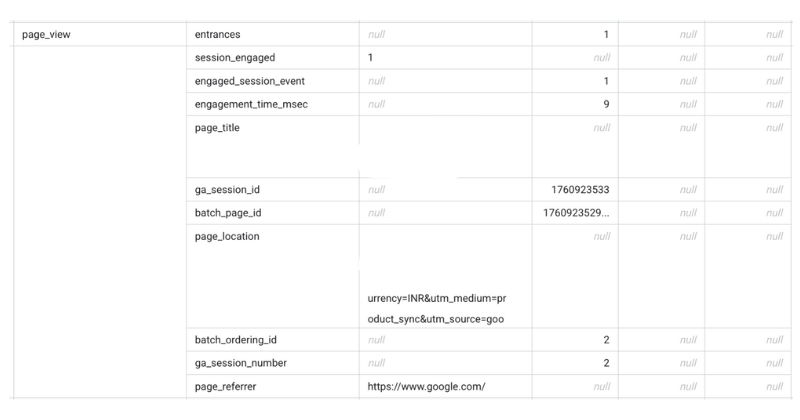
The first challenge for many analysts is – how do you even get the data out from this nested field? When this first launched, i found it very confusing. There are many different ways of doing this. However, i recommend the query below.
SELECT
  user_psuedo_id,
  event_timestamp,
  event_name,
  (
  SELECT
    MAX(COALESCE(value.int_value, value.double_value, value.float_value))
  FROM
    UNNEST(event_params) params
  WHERE
    params.key = 'ga_session_id') AS ga_session_id
FROM
  table_name
Note that there is no “group by” statement in the outer query. This is to handle cases where multiple instances of an event get logged at the same time. This can happen due to batching. The correlated subquery lets you get the data without aggregation.
A note on query efficiency
You will notice that data models from ga4dataform, velir and my own – extract most of this data in the base layers and don’t carry the event-params field into subsequent data models.
This is because event-params significantly increase the table size and query length and billing. To keep things cleaner and simpler, we extract the values in one go. Typically we do this in ‘all_events’ data model covered in previous post.
Definition of event parameters
Each event contains 10 odd key value pairs in the event_parameters array. There are no null values in this array. If a value is not available, you will not see the key corresponding to it in the array.
Page Related Parameters
page_title
event_params.value.str_value.
Useful for debugging. This contains the title of the page as visible to the visitor in their browser. Useful for identifying product names, collection names, blog names etc. if you are not using GTM-datalayer to store these values separately.
page_location:
event_params.value.str_value.
Page Location is the URL of the page. That sounds trivial but the URL is full of information which can be extracted using regex statements:
- If the user is on a section of the page, you will get the section id after a # symbol.
- If it’s the landing page, page location will have parameters appended to the URL (typically after a question mark symbol “?” ). You can use regex to extract these params as needed.
- You can also use the URL to get collection name, collection page, search query, product name, blog page, stage of checkout process and more. Pay attention to the extra parameters in the URL at various stages to understand what is available.
page_path:
this is similar to page_location, but it does not contain the hostname. It contains only the path of the page within the website. Useful if you are writing query that’s applicable to many websites.
page_referrer:
Referrer contains the URL of the page from where user initiated the current page.
For example, if user has clicked on an ad on instagram, the page_referrer would be ‘instagram.com’
If the user has clicked on a link in whatsapp, the referrer would be ‘whatsapp’
If user has clicked on a link home page and landed on a product page, page_referrer will be the URL of the homepage and so on.
It is empty (null) if user entered the URL into a address bar and arrived (how rare is that!).
page_referrer values are useful to understand how user is landing on a particular page in your website. For example, if users are landing on a product page through homepage but not through any collection, it could be missing from collections.
If user has several ‘instagram’ page_referrer values in a session, it means user is interacting with multiple ads on instagram in quick succession.
If user has ‘google’ multiple times in a session, it means user searched for something and is opening multiple links to your website.
ignore_referrer:
This is a field set through GA4 settings. This tells google analytics to ignore the referrer from ‘Referral’ source of traffic. This can be set from GA4 admin settings.
Metadata
These events are only useful in debugging queries and event logs. They contain information about when the event got logged. So they don’t reflect user behavior in any way.
batch_ordering_id
Although the events are triggered sequentially on the website, they are not continuously streamed to GA4.
Events are batched and uploaded to bigquery.
batch_page_id
This param assigns a unique, sequential number to each page a user visits within an engagement.
Typically each batch contains events from a single page so the value of batch_page_id is usually 1.
batch_event_index
(from Google’s documentation)
A number indicating the sequential order of each event within a batch based on their order of occurrence on the device.
stream_id
Not available as event parameter, but as a column. This is the stream id of the data source – as it is setup on GA4 account. Useful if you have multiple streams of data for a website. This is possible if you have data from multiple domains flowing into one GA4 account.
data_platform
Refers to the platform of the data stream. Could be (Web, IOS or Android).
Session Related
google’s documentation cover this well here.
ga_session_id
Unique identifier of the session. Covered in more detail in initiation events.
ga_session_number:
User’s session count on the website. As user tracking is not reliable, this is not useful.
engaged_session_event
Number of engaged sessions of the user. As user tracking is not reliable, this is not useful.
Engagement related
engagement_time_msec
time between previous event and this event. This is available if the event is triggered by a user action, and not available if the event is automatic.
Note that this is the time between previous logged event with user_engagement_msec field and the current event. If you sum up user_engagement_msec across all events on a page, you get the total time on page.
session_engaged:
a flag (0/1 ) indicating if it’s a engaged session. GA4 defines engaged session as 10 seconds, 2 clicks, or 1 key event.
Shopify Specific:
These params are available only for Shopify stores (and some other ecomm stores) and only for a small number of events. List of events – view_item, add_to_cart, begin_checkout, add_payment_info, add_shipping_info, purchase.
ecomm_totalvalue
This is the value of the event as it will reflect in GA4s value field.
- add_to_cart, view_item – this is the price per unit of the item being seen or added to cart.
- purchase events – this is the total value of the cart.
ecomm_pagetype
This refers to the type of the page where the event is triggered – home, product, collection, etc. If you use a 3rd party checkout that works as an overlay, the pagetype value of purchase events refers to the page in the background. This could be misleading.
ecomm_prodid
This is the unique identifier of the product and variant. This is generally stored as a string which concatenates the string ‘shopify’ with ‘product_id’ and ‘variant_id’.
You can use a regex statement to get the two ids from the field. Variant_id is more useful of the two as it is available in shopify orders table as well as item_id in Item details (covered below)
UTM Source and related fields
You can find upto 4 different values of session source in a bigquery event. But you will mostly find just 1. Let’s explore these.
- utm_parameters in event parameters. These are read from the URL. You may have even more details in the URL itself.
- collected_traffic_source: this also refers to the paremeters collected from the URL itself.
- session_traffic_source_last_click: contains the last-click attributed session traffic source data across Google ads and manual contexts, where available.
- traffic_source: contains information about the traffic source that first acquired the user. This record is not populated in intraday tables.
Very confusing, i know. If you are doing a session level analysis and want to find the source of the channel (source, medium, campaign, etc. etc.) – use the collected_traffic_source field from the very first event in the session – typically this would be session_start.
If you are doing an analysis on user, you want to know where the user came from when they were acquired – their first visit to your store. In this case, use traffic_source.
It is possible for a user to click on multiple ads of your store in the same session. You will get page_view event when the user lands and the collected_traffic_source of the event will have the details of the ad on which the user clicked.
If you are using data models available on AhaInsights, you don’t have to worry about any of this. We make sure you have the correctly scoped utm details in the models.
Device and Geo details
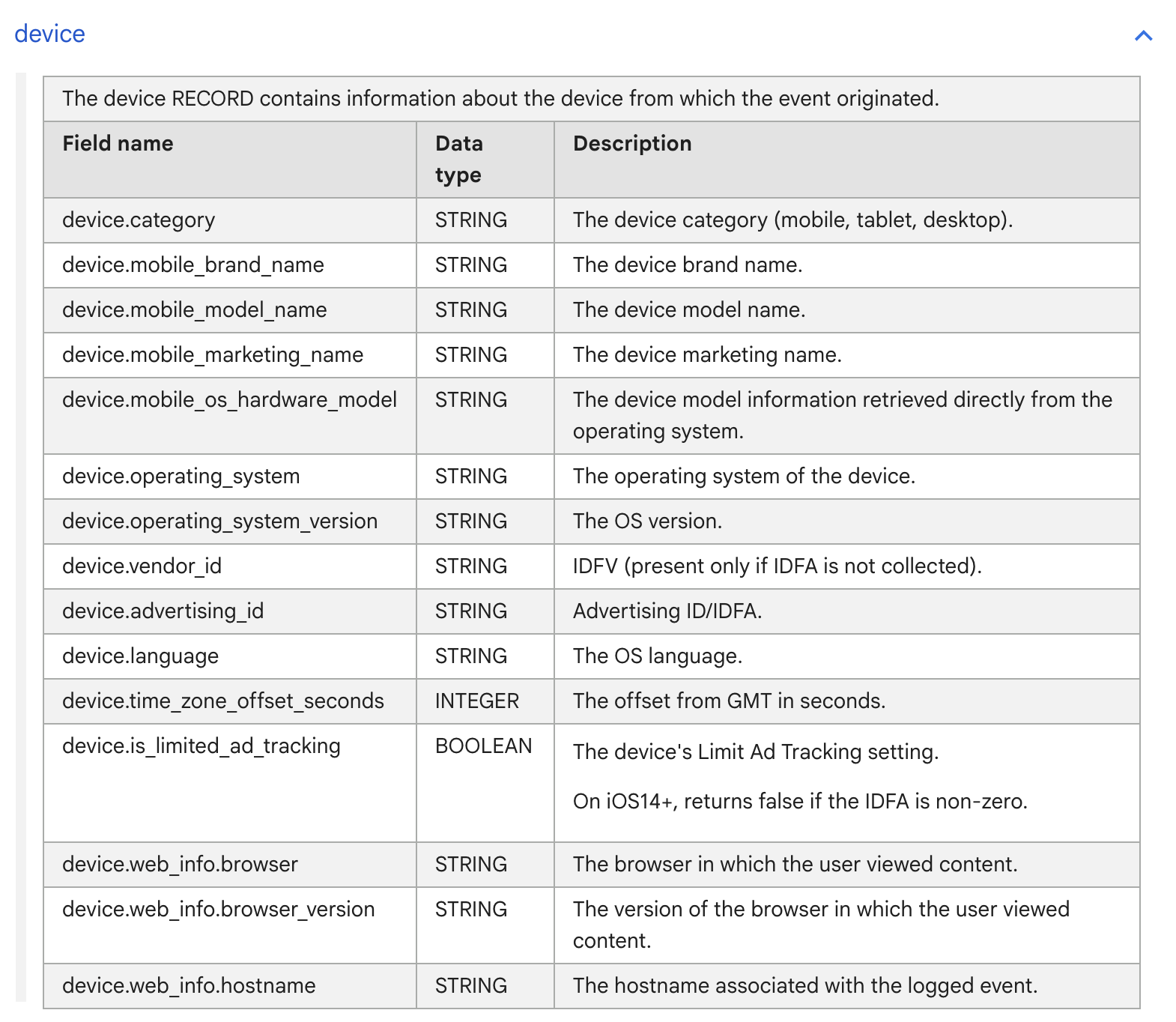
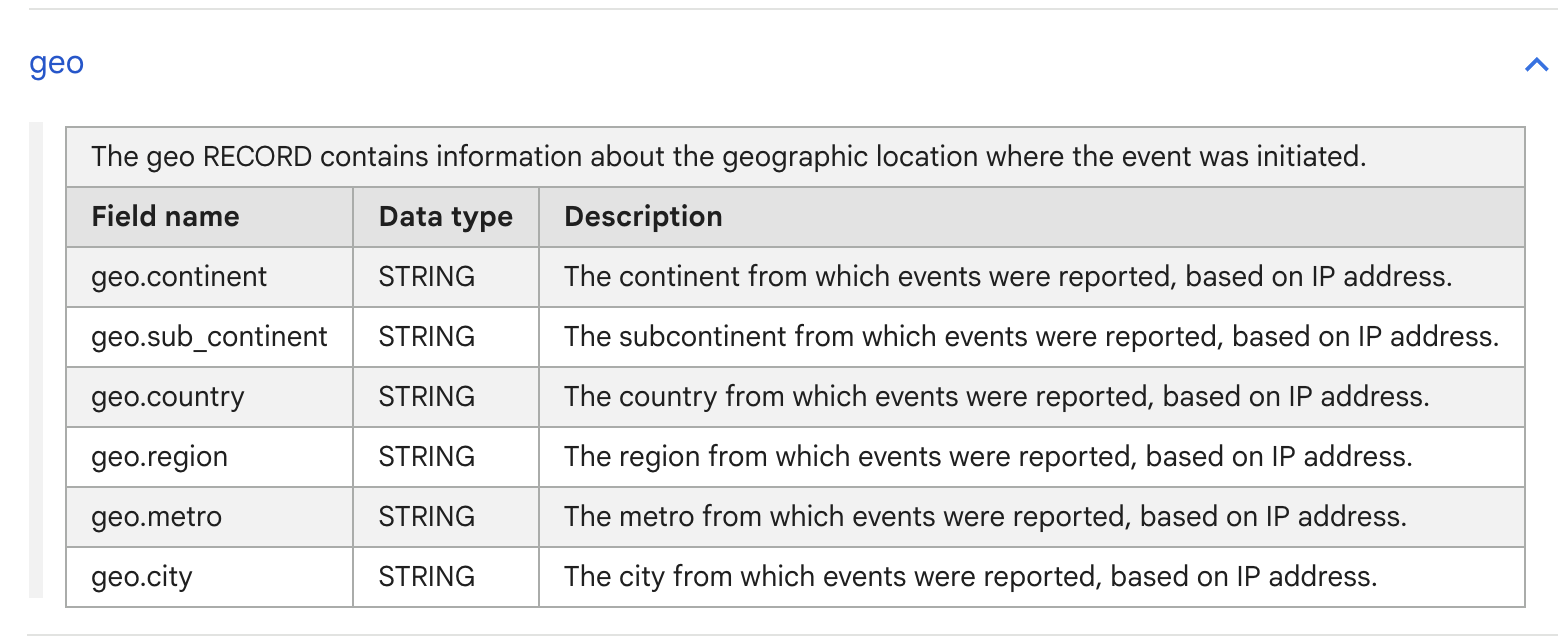
All events contain details of the user’s device and location. I have shared screenshot from Google’s documentation below as the description is obvious and does not need any explanations.
In the device record, Only two fields – device category and operating system – are useful for analysis. Other fields are useful for occasional debugging or user profiling.
Many of these fields are related to mobile apps and will be null in your data.
We also get detailed information about the user’s location in the geo record.
This is useful for reporting and profiling users as coming from tier 1 / 2 etc. Also helpful in analysing the impact of localised or offline campaigns, RCAs for bad traffic, fraud detection, etc.
Item Details
Thanks to GA4-Shopify integration, we get all the item details in the most important events. These are essential for building data models for shopify stores.
Of these, item_id, item_name, item_price are always available and most useful. I will cover these in detail in the engagement and purchase events.
Items Array
Query to extract details: link to the query, link to query 2.
| Name | Description | Availability | Comment |
|---|---|---|---|
| item_name | Name of the item variant as shown on PDP | Full | If your item name changes with variant, this will reflect the same. |
| item_id | this is the unique identifier of the item. If product has variants, the id has both item id and item variant id. | Full | Multiple variants of an item have same item id but different item variant id. |
| price | Final sale price of the item as shown to the store visitor. Includes any discount that’s already applied. | Full | |
| quantity | Number of units of the item. Typically the value is 1. | Full | Value depends on the implementation of multi-unit bundles of a product. Use after checking data for your bundle offers. |
| item_variant | Name of the variant of the item. | This is the text that visitor sees on the product page in the ‘variant selection’ area. | |
| item_category | Category of the item | Only if set in Shopify. | Useful for stores with large collections across various categories. |
| item_brand | Brand of the item. | Only if set in Shopify. | Useful for multi-brand stores. |
| item_category_2, 3, 4, 5 | Other categories of the item. | Only if set in Shopify. | |
| price_in_usd | Item price in USD. | Only available in some events. | |
| coupon | Coupon code applied on the PDP | Only available in some events. |
Events: view_item, add_to_cart, begin_checkout, purchase, add_payment_info.
Ecommerce details
Similar to Items record, we get an ecommerce record with each event. It contains useful information about the cart at the time of the event. Of these, item_quantity, purchase_revenue, transaction_id are most useful.
I will cover these in detail in the engagement and purchase events.
Ecommerce Array
Query to extract details: link to the query, link to query 2.
| Name | Description | Availability | Comment |
|---|---|---|---|
| total_item_quantity | Number of items in the cart. | Full | If there are 5 units of a item, it will be counted as 5. |
purchase_revenue_in_usd | Revenue in USD. | Full | |
| purchase_revenue | Revenue in store currency | Full | |
| refund_value_in_usd | Refund value in USD | Partial or None. | |
| refund_value | Refund value in store currency | Partial or None. | |
shipping_value_in_usd | Amount paid for shipping, in USD | Availability and quality depends on the data provider | |
| shipping_value | Amount paid for shipping, in store currency | Availability and quality depends on the data provider | |
tax_value_in_usd | Tax paid on the order, in USD | Availability and quality depends on the data provider | |
tax_value | Tax paid on the order, in store currency | Availability and quality depends on the data provider | |
unique_items | Number of unique items in the order | Only if set in Shopify. | Variants of an item count as unique items. |
transaction_id | Unique identifier of the order. | Full |
Events: view_item, add_to_cart, begin_checkout, purchase, add_payment_info.
Next Steps
This post was a short introduction to the rich data available with GA4 events once you get them into Bigquery.
As i mentioned in the beginning of this post, this can be a lot to remember / use in your work right away. But this is where you will unlock the most value from data.
Leave a Reply